The toughest interactions in your contact center are no longer about fixing simple issues. Those are already deflected by IVRs, apps, and FAQs. What reaches your agents are the messy, multi-system, emotionally charged problems where one wrong step can cost revenue, loyalty, or compliance.
That is exactly where a Contact Center Copilot earns its keep: sitting next to every agent in real time, listening, understanding, and quietly orchestrating the right guidance, knowledge, and follow-up so humans can focus on judgment and empathy, not screen toggling.This vendor-neutral playbook is for CX and Digital Transformation leaders who want to deploy a copilot that augments agents instead of replacing them – across voice, chat, and converged experiences.

AI Readiness Maturity Scorecard
Use this scorecard to:
- Assess your organization’s current readiness across strategy, data, technology, people, and governance
- Identify capability gaps that could limit the success of AI and automation initiatives
- Evaluate alignment between business objectives, operating models, and AI adoption plans
- Benchmark maturity across key dimensions required for scalable AI transformation
- Prioritize investments needed to move from experimentation to enterprise-wide AI impact
- Build a clear, actionable roadmap for advancing AI readiness with measurable milestones
Agents Under Pressure, Complexity Rising
Most contact centers have already automated the low-hanging fruit. Customers reset passwords, track deliveries, and change basic account details via self-service. What lands with human agents now is everything that automation could not confidently resolve.
That shift has radically changed the nature of front-line work:
- Interaction complexity is spiking. Complex, emotion-laden contacts are rising as a share of volume. McKinsey research shows that customer care is moving toward fewer but more complicated human interactions.
- Agents juggle fragmented systems. It is common for agents to navigate 8–12 applications per interaction – CRM, billing, logistics, knowledge bases, policy docs, collaboration tools – each with its own login and UX.
- Knowledge is everywhere, but hard to find. Product updates, policy changes, and edge cases are buried in SharePoint sites, PDFs, ticket notes, and chat channels. Search is slow and often misses context.
- Pressure from all sides. Leaders push for lower Average Handle Time (AHT), higher First Contact Resolution (FCR), tight compliance adherence, and consistent brand tone, while agents manage emotional customers and hybrid work environments.
The result is cognitive overload, inconsistent quality, and high attrition. As Gartner highlights, agent experience is now a direct driver of customer experience and loyalty. Without better in-the-moment support, throwing more scripts and static training at the problem will not move the needle.
Enter the Contact Center Copilot: a real-time, AI-powered teammate designed to tame this complexity and let humans do their best work.
Defining the Contact Center Copilot
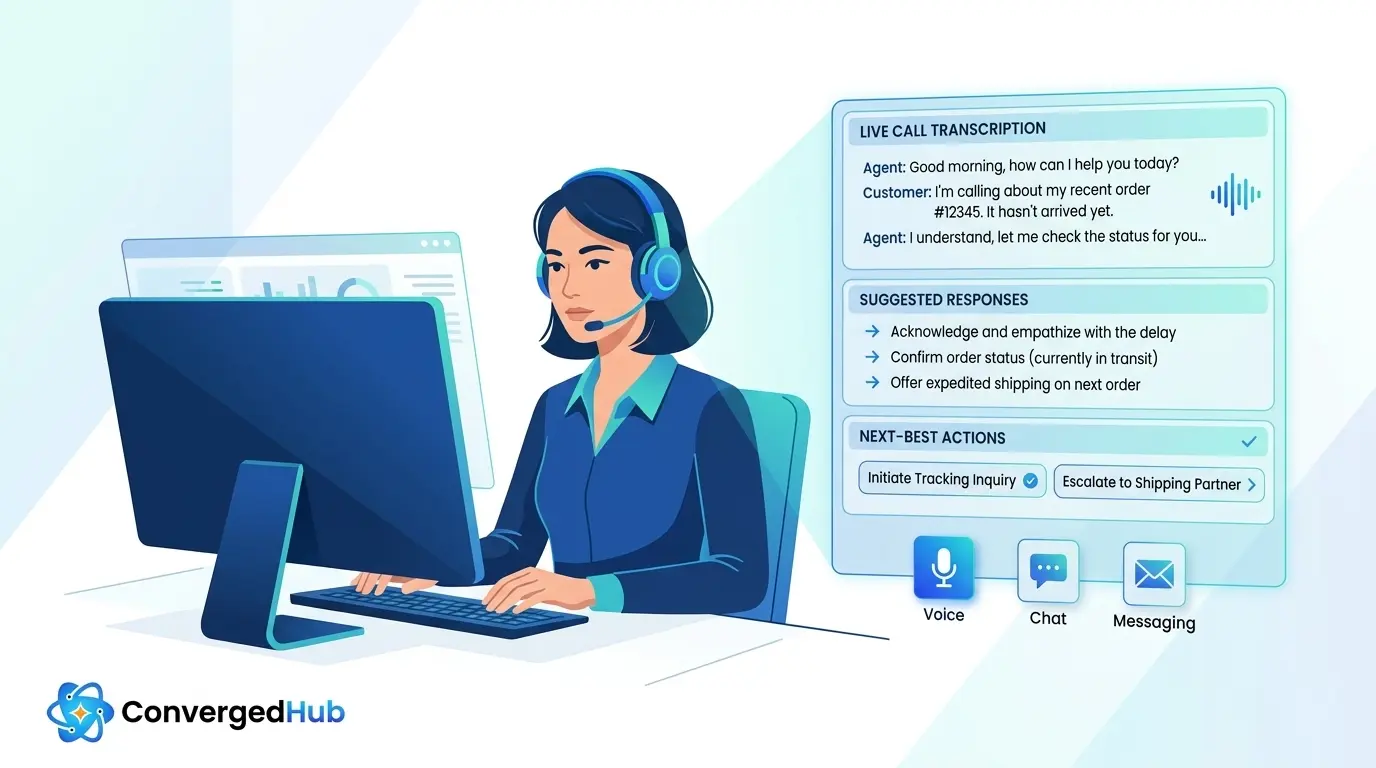
A Contact Center Copilot is a real-time, AI assistant that works alongside agents during live interactions across voice, chat, email, and messaging. It listens or reads as the conversation unfolds, understands intent and context, and then surfaces the next best information, action, or wording in the agent workspace.
It is useful to clarify what a copilot is — and is not.
Not just another desktop tool
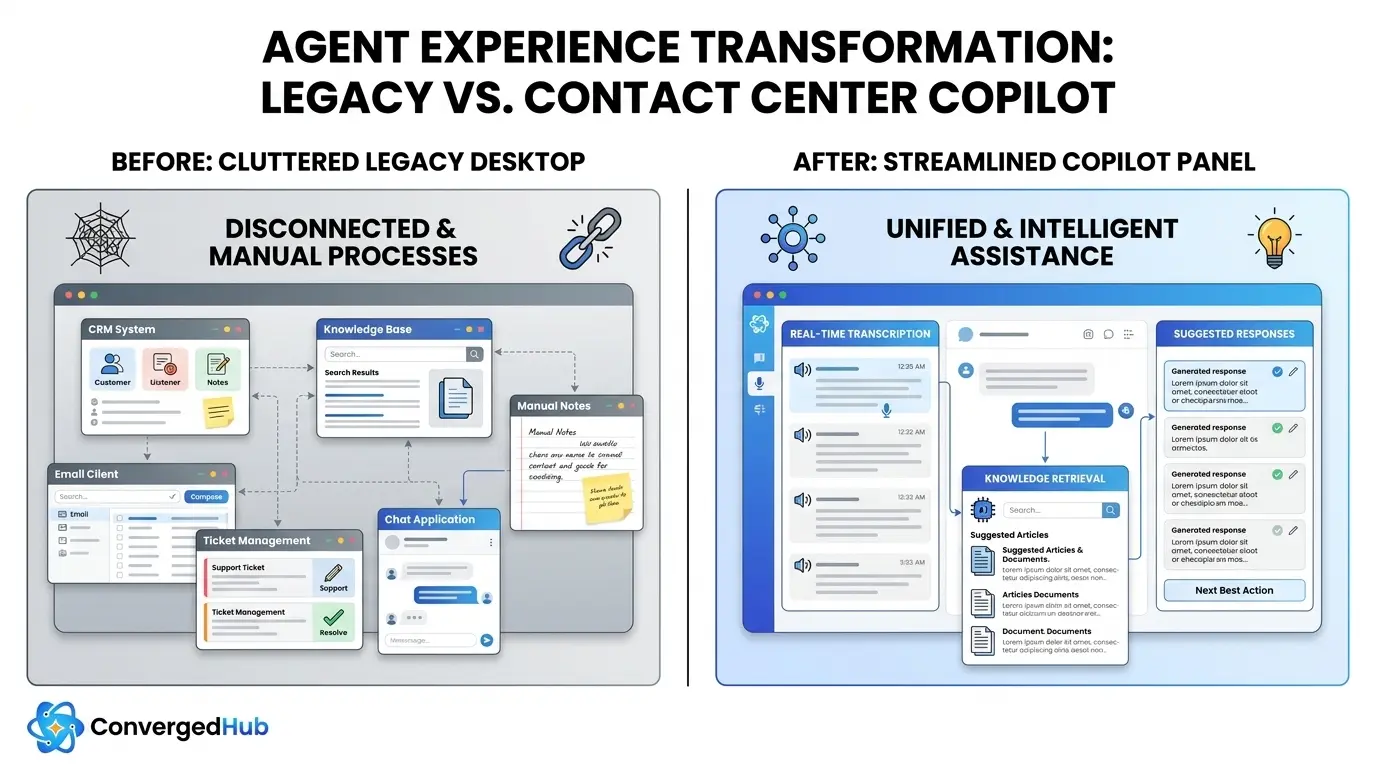
Legacy agent tools typically include CTI screen pops, static scripts, and knowledge base search. They are:
- Pull-based: agents must know what to search for and how.
- Static: content is pre-authored, often quickly outdated, and not tailored to the live context.
- Fragmented: each system offers a thin slice of the truth, forcing agents to mentally stitch the story together.
A copilot, by contrast, is push-based and contextual. It listens continuously, synthesizes signals from multiple systems, and proactively offers guidance, ready-to-send responses, and next-step suggestions without requiring agents to hunt for them.
Different from virtual agents and bots
Virtual agents or chatbots attempt to handle the entire interaction autonomously. They are customer facing. When they fail or reach the boundary of their capabilities, the interaction escalates to a human.
A copilot is agent facing. It does not talk directly to customers; instead, it equips the human agent with superpowers:
- Understanding the conversation via live transcription and natural language processing.
- Retrieving and summarizing policy, product, or troubleshooting steps from enterprise knowledge.
- Proposing compliant, on-brand language the agent can review, edit, and send.
In a modern operating model, you orchestrate both: autonomous virtual agents for fully automatable tasks, and a contact center copilot to augment humans on everything else, all powered by a shared intelligence layer and converged experiences across channels.
Real-Time Capabilities That Matter
Not all copilot features are created equal. For CX and Transformation leaders, the priority is to focus on capabilities that move needle metrics like AHT, FCR, CSAT, QA pass rate, and agent ramp time.
1. Real-time transcription and understanding
Streaming automatic speech recognition (ASR) converts voice into text as the customer speaks, while natural language processing (NLP) extracts intent, entities, sentiment, and key topics. This enables the copilot to follow the conversation in real time and anchor assistance in what is actually being said.
2. Contextual knowledge retrieval
Instead of agents manually searching multiple repositories, the copilot automatically:
- Maps customer questions to relevant knowledge articles, procedures, or past tickets.
- Highlights the exact passage that answers the question.
- Surfaces related caveats (eligibility rules, exceptions, regional variations).
With retrieval-augmented generation (more on that below), responses are grounded in your own content, not general internet knowledge.
3. Suggested responses and summaries-in-progress
Using large language models (LLMs), the copilot can generate:
- Suggested replies in the agent tone of voice for chat, email, and messaging.
- Mid-call notes that summarize what has already been covered and open tasks.
- Clarifying question prompts when the system detects missing information.
Agents remain in control, editing before sending, but they no longer start from a blank page.
4. Next-best action and workflow guidance
By combining context (customer profile, journey history, products, sentiment) with business rules and analytics, the copilot proposes:
- The next step in a troubleshooting flow or claim process.
- Save or upsell offers tailored to the customer segment and risk score.
- Eligibility checks that should be run before committing to an outcome.
This reduces handle time variance between top and average performers and makes complex interactions repeatable.
5. Compliance prompts and guardrails
Regulated industries need in-the-moment support for disclosures, consent language, and forbidden phrasing. The copilot can:
- Prompt required disclosures at the right moment.
- Flag risky language before it is sent or spoken.
- Auto-redact sensitive data from transcripts and summaries.
6. Automated call summaries and ACW
After-call work (ACW) is a hidden tax on every contact. Copilot capabilities here include:
- Auto-generated call summaries in a structure aligned to your QA form.
- Automatic disposition codes and reason tagging.
- Creation or update of CRM cases, tasks, and follow-up emails based on the interaction.
Leaders who deploy these capabilities together often see dramatic gains. According to McKinsey, AI-enabled customer care can reduce call handling times by up to 40 percent while improving customer and employee satisfaction when implemented thoughtfully.
The Tech Stack Under the Hood
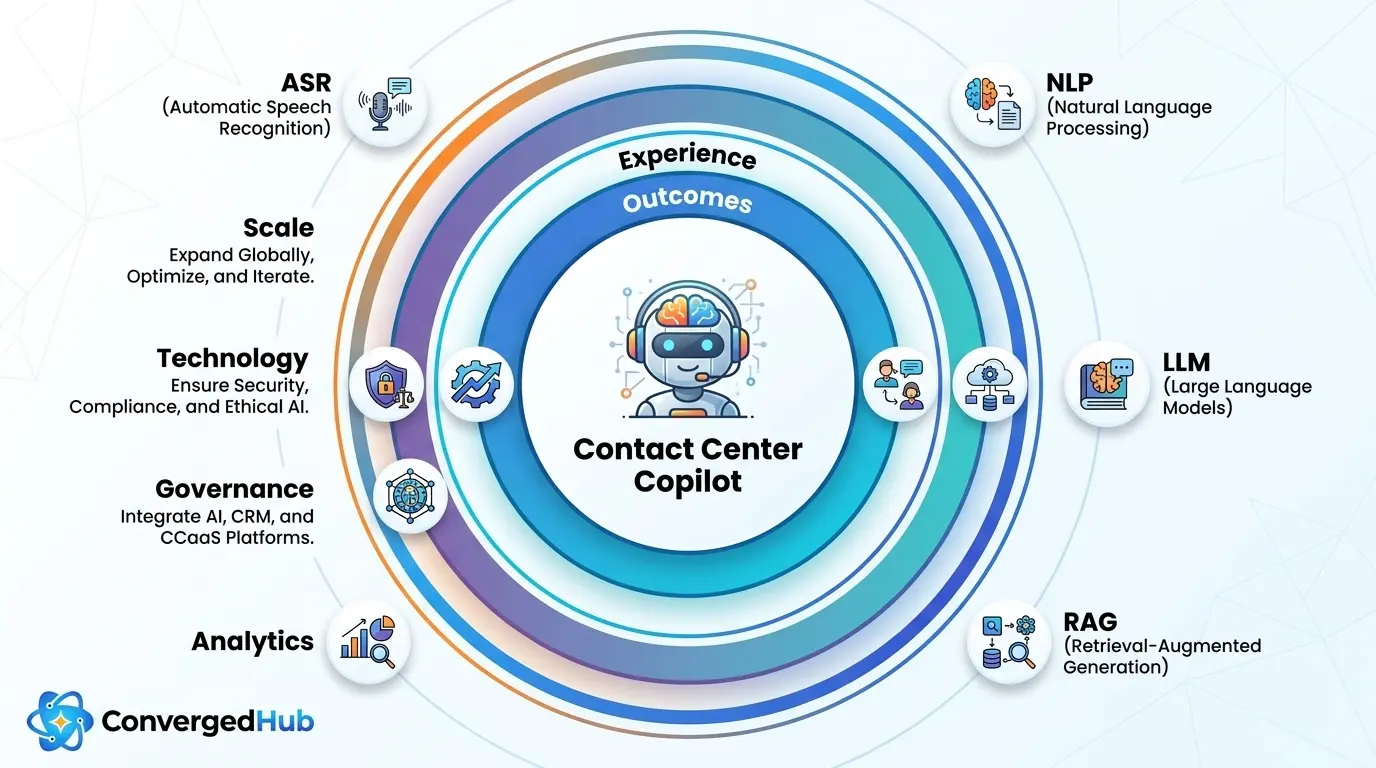
A modern Contact Center Copilot is powered by a set of complementary technologies working in concert. Understanding this stack helps leaders make informed, vendor-neutral decisions.
Streaming ASR for live transcription
Automatic speech recognition converts audio into text in near real time. For enterprise use, look for:
- Low word error rate on your languages and accents.
- Support for domain-specific vocabularies (product names, acronyms).
- Streaming APIs with sub-second latency.
NLP and conversation intelligence
Natural language processing layers classify intent, extract entities (account numbers, product types), detect sentiment, and identify topics or reasons for contact. Over time, this creates a rich dataset for conversation analytics and proactive improvement of journeys and scripts.
Large language models (LLMs)
LLMs generate human-like text, summarize long interactions, and rephrase content in different tones or formats. In an enterprise copilot, they are typically:
- Orchestrated behind APIs rather than exposed directly.
- Prompted with conversation context and business rules.
- Constrained by grounding them in your internal knowledge.
Retrieval-augmented generation (RAG)
To avoid hallucinations and keep answers accurate, most modern copilots use retrieval-augmented generation. As documented in Microsofts RAG overview, the model first retrieves relevant documents from your knowledge stores, then generates answers that cite those sources. This makes the AI both more trustworthy and auditable.
Analytics and feedback loops
Analytics engines aggregate interaction data to show:
- How copilot suggestions impact AHT, FCR, CSAT, and QA scores.
- Where agents frequently override suggestions (a signal that content or logic needs refinement).
- Emerging topics and failure modes in customer journeys.
These insights feed continuous improvement and help you demonstrate ROI to stakeholders.
Integrations and converged experiences
The copilot must integrate with your existing stack:
- CRM and ticketing (for screen pops, case creation, and history).
- Knowledge bases and document repositories (for retrieval and grounding).
- WFM and QA tools (for scheduling, scoring, and coaching workflows).
- Telephony and contact center platforms (for call events and audio streams).
Architecturally, leading organizations aim for a single copilot layer that works across voice and digital channels, so agents get a converged experience whether they are on calls, chat, or asynchronous messaging.
Enterprise Use Cases And Integrations
To build a business case, it helps to map copilot capabilities to concrete use cases across functions, then align them with your core systems.
Customer service and billing
In high-volume service environments, the copilot can:
- Pull up account history and recent interactions as soon as the customer is identified.
- Suggest empathetic opening and closing scripts tailored to sentiment.
- Surface policy details, eligibility rules, and fee waiver guidelines in real time.
This supports higher FCR and more consistent decisions, especially for newer agents.
Technical support and troubleshooting
For tech support desks, a copilot can turn complex runbooks into step-wise, interactive guidance:
- Recommend specific diagnostic questions based on device, product, and error descriptions.
- Fetch logs, known issues, or release notes associated with similar tickets.
- Generate concise repro steps and resolution notes for handoffs to engineering.
The result is lower handle time variance between experts and mid-tier agents.
Sales, collections, and retention
In revenue-impacting functions, the copilot helps agents balance persuasion with compliance:
- Sales: live battlecards, competitive comparisons, and offer configuration guidance based on the customers profile.
- Collections: prompts for mandated disclosures, hardship options, and next-best payment arrangements.
- Retention: churn risk indicators plus suggested save offers based on tenure, value, and behavioral signals.
Deep integrations for end-to-end flow
To make these use cases real, integration patterns matter:
- CRM integration (for example Salesforce, Microsoft Dynamics): read customer data and write back summaries, tasks, and dispositions.
- Ticketing and ITSM (ServiceNow, Zendesk): auto-create or update incidents with AI-generated notes.
- Knowledge systems (Confluence, SharePoint, wikis): serve as the ground truth corpus for RAG.
- WFM and QA (NICE, Verint): push interaction scores and coaching opportunities into existing workflows.
As you link the copilot into this ecosystem, you also unlock a richer metric stack. Gartner recommends focusing on outcome metrics like issue resolution and customer effort; a well-integrated copilot gives you the instrumentation to track these systematically.
Implement, Govern, And Scale
Deploying a Contact Center Copilot is not a one-off IT project; it is an operating model change. A structured approach keeps you grounded in outcomes, not novelty.
1. Start with outcomes and baselines
Before piloting, define clear goals and how you will measure them. Common metrics include:
- AHT and handle time variance.
- FCR and repeat contact rate.
- CSAT, NPS, or customer effort scores.
- QA pass rate and compliance adherence.
- Agent ramp time to proficiency.
Capture current baselines so you can attribute improvements to the copilot, not just seasonal variation.
2. Choose the right pilot use cases
Ideal starting points are high-volume, moderate-complexity queues where:
- Knowledge is available but hard to navigate.
- Variation between top and average agents is high.
- Customers feel friction but there is room to experiment.
Begin with a focused set of capabilities (for example transcription, knowledge retrieval, and call summarization) before layering on advanced next-best actions.
3. Design the agent experience
The best tech will fail if the UX overwhelms agents. Co-design with them:
- Use a single, unobtrusive panel rather than multiple pop-ups.
- Clearly label AI content and show source citations so trust can build over time.
- Allow quick feedback (thumbs up or down) to tune suggestions.
4. Govern for risk, trust, and compliance
Responsible deployment requires explicit governance. The NIST AI Risk Management Framework is a useful reference. Key practices include:
- Hallucination control: require RAG grounding for customer-facing content, and restrict freeform generation where stakes are high.
- Latency budgets: set and monitor maximum response times, with fallbacks if the copilot is slow or unavailable.
- Privacy and security: encrypt data in transit and at rest, apply role-based access, and comply with regulations such as GDPR and sector-specific rules.
- Human-in-the-loop: keep agents accountable for final decisions; AI suggests, humans decide.
5. Pilot, learn, and scale
Run a controlled pilot with a subset of agents over 8–12 weeks:
- Compare pilot vs control groups on your defined KPIs.
- Collect qualitative feedback from agents, supervisors, and QA.
- Iterate prompts, knowledge sources, and UX based on what you learn.
Once you see sustained improvements, scale in waves across lines of business and geographies, reusing integration and governance patterns.
6. Look ahead to multimodal and proactive assist
The next generation of copilots will be multimodal (understanding not just text and audio, but also screens, documents, and even customer emotion) and increasingly proactive (surfacing insights before agents ask). For example, voice AI agent assist solutions such as Google Clouds Agent Assist illustrate how real-time transcription and suggestions can evolve into a broader, predictive coaching layer.
By laying the right foundations now — in technology, governance, and change management — you position your organization to take advantage of these advances without having to rip and replace.
The move to a Contact Center Copilot model is not about replacing agents with algorithms. It is about giving every agent the real-time intelligence, guidance, and automation that only your very best experts enjoy today.
For CX and Digital Transformation leaders, the opportunity is clear: design a copilot that augments humans, anchors on measurable outcomes, and spans both voice and digital channels. Do that well, and you transform not just contact center metrics, but the everyday experience of customers and agents alike.